




Using Multimodal AI to Build Consistent Visuals for eLearning
A practical guide for Instructional Designers
By: Chai Lee Fung (eLearning Minds)
AI adoption among instructional designers has surged, with ATD’s 20251 research showing that nearly two-thirds began using these tools in just the last 12 months and 96% of them are already using generative AI to build multimodal experiences across text, audio, and video.
Using multimodal AI to generate visuals—such as images and short videos has significantly reduce development time as Instructional Designers use AI tools to streamline early‑stage design and reduce production bottlenecks. However, visual creation still presents challenges, with consistency across characters, settings, and styles remaining one of the most persistent issues.
This article walks through four things: what multimodal AI involves and how prompting for visuals differs from text, the challenges of using it for eLearning, a practical framework for solving the consistency problem, and how to bake it into your development workflow.
1. What Is Multimodal AI — and How Does Prompting for Visuals Differ From Text?
We commonly prompt for textual content where our instructions are descriptive you tell the AI what information you want. Prompt engineering is the practice of designing clear, structured inputs that guide an AI system to produce accurate, relevant, and high‑quality outputs.
While the core principles of prompting remain the same, multimodal prompting adds additional layers of complexity. Prompting for visuals requires more directions—you need to specify the composition, mood, motion, and style.
You’re not conveying information you’re composing a scene. Think of it less like writing a content brief and more like briefing a creative director on a shoot. You need to think about:
- Who is in the scene — age, appearance, role, emotional state
- What is happening — action, body language, spatial relationship between people
- Where it takes place — setting, lighting, time of day, level of detail in the background
- What it should feel like — the tone, the visual style, whether it reads as corporate, warm, tense, or casual
A practical prompt structure for eLearning visuals
Think of every image prompt as having four layers:
(1) Subject — who or what is in the scene.
(2) Context/Setting — where this takes place and what surrounds the subject.
(3) Style/Tone — illustration vs. photorealistic, branding guidelines, colour palette.
(4) Technical specs— aspect ratio, framing (close-up, mid-shot, wide), lighting. Build these four layers into every prompt you write and you’ll get far more predictable outputs.
2. The Real Challenges for eLearning Visual Generation
Creating a single image with AI is easy. Creating thirty visually consistent images that hold together across an entire course module is where most Instructional Designers run into problem. eLearning has continuity demands characters, environments, camera angles, branding that marketing and social media content simply don’t require.
Consistency across scenes
In a scenario-based module, the same character might appear in eight to twelve different screens: listening, questioning, frustrated, relieved. Generic AI generation will produce a different version of that character every single time unless you’ve built a system to prevent it. Hair colour shifts. The office changes. The clothing style drifts.
Visuals have pedagogic values
Unlike a marketing banner, every image in an eLearning module should have instructional purpose reducing cognitive load, making a scenario feel authentic, or signalling an emotional shift in the narrative. A visually impressive image that doesn’t serve the learning objective is noise. This reality changes the creative brief in a fundamental way.
Scenario-based learning demands more than posing
Characters need to act, not just stand there. Facial expressions, gesture, posture, and interpersonal dynamics all carry meaning in a scenario. Getting AI to reliably generate nuanced emotional states especially across multiple scenes requires deliberate prompt design.
Inclusive Visual Design at Scale
Ensuring representation in eLearning isn’t optional it’s foundational. Our audiences span a wide range of ages, ethnicities, genders, abilities, and professional roles, and our visuals need to reflect that diversity with intention. When working with multimodal AI, this means building those representation requirements directly into the prompt. Doing it well requires thoughtful planning and a structured approach, especially if we want consistent, authentic results across an entire module.
3. The Anchor-Variable Framework
The Anchor-Variable Framework is a practical system for solving the consistency problem. It works by dividing a prompt into two parts: the fixed elements that must remain identical across every scene, and the variable elements that can change from image to image.
Anchors: Define once, reuse always
Anchors are the fixed elements of your visual system. You define them in detail at the start of a project and store them as a master prompt block that you reuse every time you generate new scenes. In a typical scenario‑based module, your anchor block might include:
- Character: Character description – name, age, ethnicity, physical features (hair colour and style, build), and what they’re wearing in the scene
- Environment: Setting description – the environment (open-plan office, hospital corridor, retail floor), colour palette, lighting style
- Style: Visual style – photorealistic / semi-illustrated / flat illustration, aspect ratio, brand colour scheme
Variables: What changes scene to scene
Variables are the scene-specific elements that changes. You specify what needs to change:
- Facial expression and emotional state (e.g. ‘appears frustrated, brow furrowed’)
- Body language and gesture (e.g. ‘arms crossed, looking away from the camera’)
- Who else is in the scene (e.g. ‘a colleague approaching from the left’)
- The specific action taking place (e.g. ‘reviewing a document at her desk’)
- Any contextual prop or visual detail specific to this scenario
What it mean
Each image prompt is built from three layers:
Character Anchor: Fixed visual identity: appearance, clothing, accessories, posture
Setting Anchor: Fixed environment: room, lighting, furniture, branding, time of day
Scene Variable: What changes per screen: emotion, gesture, action, props, framing
Full Prompt = [Character Anchor] + [Setting Anchor] + [Scene Variable]
See it in Practice
Step 1: Define your Character and Setting Anchors. Generate these images and upload them as reference images for your prompts to generate new images based on these anchors.
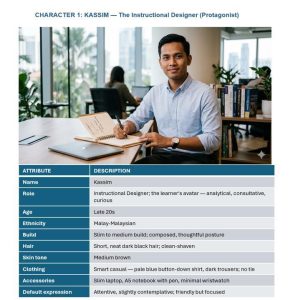

Step 2: Upload the Character and setting Anchors as reference images, then describe the variables to compose your scene.
PROMPT: Kassim seated at desk reviewing his project brief. Kassim sits at his design desk, leaning slightly forward, eyes scanning a printed project brief. Expression: focused, slightly curious. Laptop open to one side. Warm office light. Mid-shot framing, slight over-shoulder angle. Setting B: Kassim’s Workspace. Style: Photorealistic.

Image 1: Kassim reviewing a document
PROMPT: Kassim sits at the meeting table, slightly pulling back, with a contemplative expression mouth slightly closed, eyes thoughtful, brow gently furrowed. He is weighing his options. He holds his pen over his notebook. Setting A: Meeting Room.

Image 2: Kassim in a meeting
4. Making It Scalable: Build a Prompt Library
The Anchor‑Variable Framework addresses the consistency challenge, but for AI to truly scale in eLearning production, it needs to be embedded into the broader workflow. A practical starting point is to build a Prompt Library reusable prompt structures that can be adapted across projects simply by swapping out the variables to match new scenes or contexts.
The prompt library
This is the step most teams overlook, yet it’s the one that delivers the biggest long‑term payoff. Just like reusable templates, you can create prompt assets once and apply them across multiple scenes or even entirely new modules. For example, you might build a character library featuring the same character in different poses and emotional states, all with transparent backgrounds. These characters can then be placed into new environments or combined with additional characters introduced later in the story. Over time, a well‑maintained prompt library becomes a powerful production asset one that dramatically improves speed, consistency, and overall productivity.
Where This Is Going
The AI tools will keep improving. Consistency will get easier. Iteration cycles will shorten. But the instructional judgment about what a visual needs to achieve, and the creative direction to make it happen stays with you.
Tags: #eLearning #InstructionalDesign #MultimodalAI #LearningDesign #AIinLearning #ScenarioBasedLearning
Citation 1: Association for Talent Development. (2025, August 4). ATD research: AI tools are benefitting instructional designers. https://www.td.org/content/press-release/atd-research-ai-tools-are-benefitting-instructional-designers